
Overview
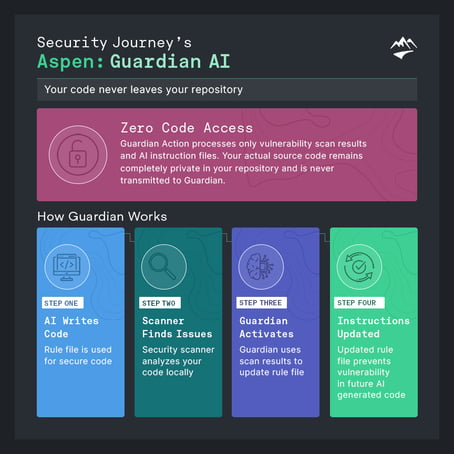
How It Works
-
It transforms these findings into rules your AI assistant can use to prevent and remediate future vulnerabilities.
-
It updates your rules file through a pull request, allowing you to review, modify, and approve the changes.
The Result
Supported Scanners
Guardian Action provides robust support for the following security scanners:
- Bandit - Python security scanner
- Snyk - Multi-language dependency and code scanner
- SonarQube - Open-source static code analysis platform
- Semgrep - Multi-language static analysis
All supported scanners produce SARIF-formatted output. And, other scanners that produce SARIF output are also compatible.
Support for additional scanners is planned for future releases.
To integrate with Guardian, scanners must produce JSON-formatted output that the Guardian service can ingest and process.
If you have a scanner you’d like to use that isn’t currently supported, please reach out to your Account Manager or contact us at support@securityjourney.com.
Configuration and Setup
Prerequisites
To complete this setup in GitHub, you must have the following access:
-
Organization or Repository Admin access
Required to add or manage secrets (e.g., Actions secrets, environment secrets CI/CD variables). -
Write/Commit access to the repository
Required to create or update pipeline configuration files. -
Note: CODEOWNERS restrictions may apply
If the repository uses aCODEOWNERSfile, workflow changes may require review and approval from designated code owners before they can be merged.
Integration Methods
Guardian AI is delivered through the Aspen Connector — a single integration that works across both GitHub Actions and GitLab CI.
GitHub Actions:
Example:
```yaml
jobs:
  aspen:
    permissions:
      contents: write
    steps:
      - uses: actions/checkout@v4

      - name: Run scanner
        run: snyk code test --sarif > results.sarif || true

      - uses: SecurityJourney/aspen-connector@v1.0.0
        with:
          api_token: $
          scan_results_path: results.sarif
          instruction_file_path: .github/ai-instructions.md
```
GitLab CI:
Example:
```yamlaspen: image: node:22 rules: - if: $CI_PIPELINE_SOURCE == 'merge_request_event' before_script: - git remote set-url origin "https://gitlab-ci-token:${CI_JOB_TOKEN}@${CI_SERVER_HOST}/${CI_PROJECT_PATH}.git" script: - npx @securityjourney/aspen-connector@1.0.0 variables: ASPEN_API_TOKEN: $SECURITYJOURNEY_TOKEN ASPEN_SCAN_RESULTS_PATH: results.sarif ASPEN_INSTRUCTION_FILE_PATH: .gitlab/ai-instructions.md```
See the Aspen Connector on GitHub for full documentation and all configuration options.
Need Help Integrating with CI/CD?
Want to integrate Aspen: Guardian into your CI/CD pipeline? Contact your Account Manager or email support@securityjourney.com