
SCORM Lesson Attempts Report Guide
This guide explains how to access and download the SCORM Lesson Attempts report in Security Journey. Generating this report gives you better visibility into platform activity and allows you to easily cross-reference completion data with your Learning Management System (LMS).
This workflow is intended for Security Journey administrators. You will use this process when you need to audit lesson attempt records or troubleshoot discrepancies between Security Journey and your organization's LMS.
Accessing SCORM Lesson Attempts Report 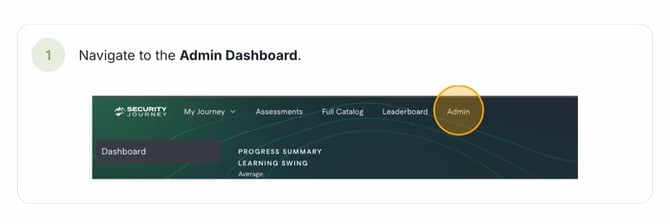
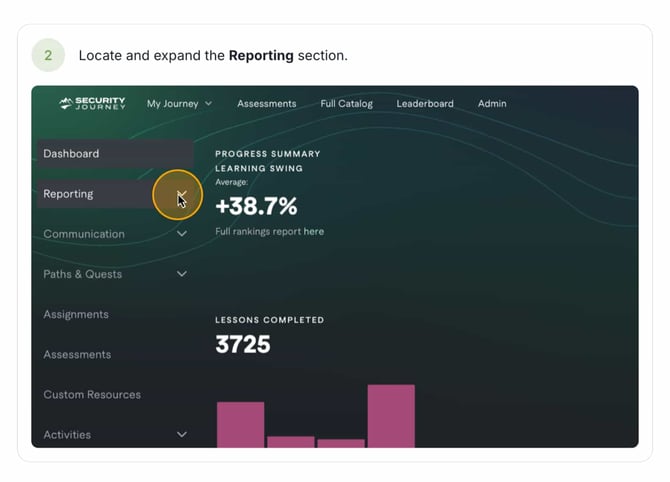
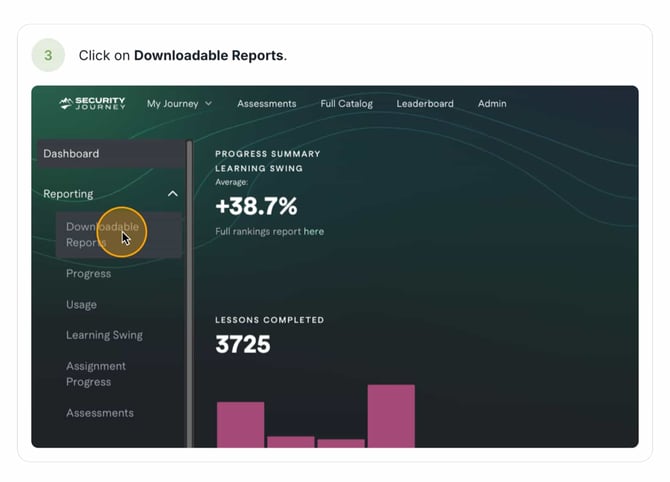
Generating the Report
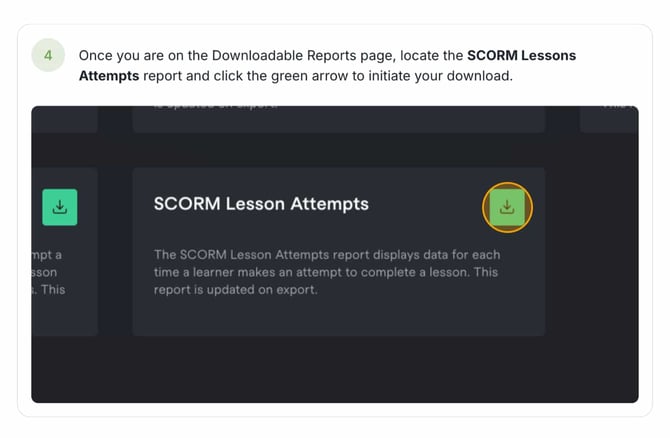
Inside The Report
Once downloaded, you will find the five following columns.
|
|
Lesson Title |
Created At |
Status |
Completed At |
|
Users Email Address |
Title of Lesson Accessed |
Date & Time lesson was accessed |
Completion Status of the lesson |
Date & Time of completion |
The SCORM Lesson Attempt report displays a dedicated row for each time a learner makes an attempt to complete a lesson through the SCORM functionality.
This report is not retroactive. Data collection for SCORM lesson attempts began on June 7th 2026.
Frequently Asked Questions:
Q: When is the data in the SCORM Lesson Attempts report updated?
A: The report data is updated immediately at the time of export, ensuring you get the most current and accurate information available.
Q: Can I see SCORM attempt data from before June 7th 2026?
A: No, the report is not retroactive. Data collection for this specific report began on June 7th, so activity prior to that date will not be included.