
New Content: Optimizely Breach
Released: November 19, 2026
Overview
In November 2026, attackers injected malicious JavaScript into Optimizely’s hosted scripts. That turned a trusted third-party script into a card skimmer on 178 organizations’ websites. Security Journey released two new learning paths, one for JavaScript and one for TypeScript. They teach developers the two main defenses:
- Freezing vendor scripts: releasing third-party updates through your own pipeline instead of loading them live.
- Hosted payment fields: moving card entry into hosted fields so card data isn’t exposed in your page’s DOM.
Paths:
Optimizely Breach (JavaScript)
3 lessons · about 28 minutes · Foundational
| # | Lesson | Length |
|---|---|---|
| 1 | Security Brief: Optimizely Supply-Chain Breach | 1 min |
| 2 | (JavaScript – React) Secure Vendor Script Releases | 15 min |
| 3 | (JavaScript – React) Card Fields Exposed in the DOM (Hosted Fields) | Magecart | 12 min |
Optimizely Breach (TypeScript)
3 lessons · about 26 minutes · Foundational
| # | Lesson | Length |
|---|---|---|
| 1 | Security Brief: Optimizely Supply-Chain Breach | 1 min |
| 2 | (TypeScript – React) Secure Vendor Script Releases | 15 min |
| 3 | (TypeScript – React) Card Fields Exposed in the DOM (Hosted Fields) | Magecart | 10 min |
Who it’s for: Frontend, backend, and full-stack web developers working in React. The TypeScript path is also tagged for DevSecOps.
Details:
- Languages: JavaScript and TypeScript (React)
- CWEs: 829 (Inclusion of Functionality from Untrusted Control Sphere) and 830 (Inclusion of Web Functionality from an Untrusted Source)
- Availability: Enterprise bundle
Finding it: Both paths are recommended paths in the content catalog. Learners will also see a pop-up on their journey page that links to them. Admins can add either path to a new or existing assignment. The Security Brief lesson is the same in both paths, so pick the path that matches your team’s language.
Questions? Contact your Account Manager or support. For security questions about the vulnerability itself, email security@securityjourney.com.
Nov 16, 2026
Audit Log & Skills Lab Updates
We’re introducing a new Audit Log to give administrators greater visibility into activity across the platform, along with an update to Skills Lab naming.
New: Audit Log
The Audit Log is now available to all customers under the new Governance section. The Audit Log provides administrators with a record of who did what and when across the platform, helping support security, compliance, and troubleshooting efforts.
Currently Logged Activities
- User Changes: Creation, updates, archiving, and unarchiving of users, individually or in bulk, including changes made through SCIM, CSV import, manual entry, and SAML just-in-time provisioning.
- Security Configuration: SSO setup and enablement or disablement, API token and key issuance and revocation, and changes to webhook and xAPI endpoints and credentials.
- Data Exports: Exports of users, assessments, individual assessments, assignments, SCORM lesson attempts, and user and report datasets.
- Assignments: Changes to assignment policies and audiences.
- Tournaments: Tournament creation, updates, and deletion.
Improvements
AI Skills Lab Lessons Are Now Skills Lab
- AI Skills Lab has been renamed to Skills Lab across the platform.
- This updated name better reflects the broader range of skills taught through this content type beyond AI.
Nov 9, 2026
Copilot Support, MCP Enhancements & Platform Improvement
We’re expanding MCP capabilities with support for Microsoft 365 Copilot and introducing several platform improvements to make content easier to find, administrative tasks clearer, and key pages faster and more seamless
New: Copilot Support for MCP
- The Security Journey MCP now has backend support for connecting with Microsoft 365 Copilot, including Copilot in Teams.
- This expands the ways organizations can connect Security Journey with the AI tools they already use.
MCP Improvements
More Reliable MCP Results
- MCP tools now return structured data, helping AI clients interpret and display results more consistently.
Improvements
Simplified Full Catalog Experience
- The Full Catalog now opens with all content displayed by default, without requiring users to select a filter.
- Filters start expanded for easier access, and filter chips have been removed for a cleaner experience.
Overdue Status on the Admin Dashboard
- Administrators can now see which Assignments and Assessments are overdue directly from the Admin Dashboard.
- This makes it easier to identify items that need attention and quickly take the appropriate next steps.
Easier Lesson Reordering
- A redesigned reorder experience within custom path editing makes it simpler to move lessons and organize content.
Learner Profile Form Remembers Answers
- The learner profile form now opens with previously saved answers instead of displaying a blank form.
Updated Search Insights Wording
- The tenant dropdown in Search Insights now displays “All of Security Journey” instead of “Platform-wide” for greater clarity.
Smoother Journey and Champions Passport Pages
- My Paths and My Quests now load more smoothly without a visual blip.
- Evaluate and Mentor pages make fewer calls, improving page load performance.
Nov 6, 2026
MCP Usage Insights & Platform Improvements
We’re giving administrators greater visibility into MCP adoption while introducing several improvements across the platform to make everyday tasks faster, clearer, and easier to manage.
New: MCP Usage Stats for Admins
- Administrators can now view MCP usage statistics directly from the MCP card.
- See how many users have connected and which AI tools they’re using, providing greater visibility into MCP adoption across your organization.
Improvements
Faster Home and Judgment Pages
- To-dos and Judgment requests now load faster, improving performance across these frequently used areas.
Catalog and Path Card Fixes
- Level and Enrolled indicators now display correctly on catalog and path cards.
- Tournaments now require key information to be completed before they can be saved.
Easier-to-Read Screens
- Licensed status is now clearer when using dark mode.
- Improved spacing provides a better experience on larger monitors.
- AI lesson durations now display correctly.
Dedicated API Tokens Page
- API tokens now have their own dedicated page, making them easier for administrators to find and manage.
Content Type Hover Text Restored
- Hover text has been restored to Catalog filters, making it easier to understand what each content type represents.
Oct 29, 2026
New Content: PHP2Shell
Overview
PHP2Shell is a remote code execution (RCE) vulnerability in PHP that was disclosed in October 2026. Security Journey released a new learning path that explains what happened and what developers can do about it. It covers why patching is the main fix and how to limit the damage when a patch isn’t available yet.
Path: PHP2Shell: From Emergency Patch to Blast-Radius Control
3 lessons · about 13 minutes · Foundational
| # | Lesson | Type | Length |
|---|---|---|---|
| 1 | PHP2Shell Explained: What Broke and How to Patch | Video | 2 min |
| 2 | PHP2Shell: Protecting Against the Next Zero-Day | Video | 1 min |
| 3 | PHP2Shell: Containing the Blast Radius of a PHP RCE | Break/Fix (hands-on) | 10 min |
Who it’s for: Web developers, DevSecOps engineers and AppSec professionals, especially teams that work with PHP.
Details:
- Language: PHP
- CWE: 94 (Code Injection)
- Availability: Enterprise bundle
How to assign it: Admins can find the path under recommended paths in the content catalog and add it to a new or existing assignment.
Questions? Contact your Account Manager or support. For security questions about the vulnerability itself, email security@securityjourney.com.
Oct 19, 2026
Admin Navigation Updates & Introducing AppLab
We’ve made updates to the Admin experience and introduced a new hands-on lesson type!
New: Admin Navigation Reorganization
The Admin navigation has been reorganized to better follow the admin workflow and make key areas easier to find.
Dashboard is now pinned at the top, with Aspen directly below it, followed by:
Users → Paths & Quests → Assessments → Assignments → Reporting
We’ve also made a few additional changes:
- Communications and Custom Resources now live under Customizations.
- Activities has been renamed to Champion Passport.
New: AppLab Lesson Type
Introducing AppLab, a new hands-on lesson type available in AI Advantage tenants!
AppLab lessons offer a streamlined hands-on experience with:
- No instructions panel
- Run Tests built directly into the sandbox
- Lessons that recognize your current state
- A fun character as part of the experience
Oct 12, 2026
Assignment Management, MCP Updates, and Search Improvements
New: Assignment Landing Page
Admins now have a dedicated landing page for Assignments, making it easier to view and manage assignment progress.
-
The Overview tab provides high-level path statistics, while the Audience tab shows progress for every user in the assignment and allows admins to add new users directly to the assignment.
New: Updated Assessments Page
The Assessments page has also been updated with the same enhanced UI experience as the new Assignments page, bringing the updated look and functionality to assessment management as well.
MCP Updates
- Multi-Tenancy Support for Claude: Admins with more than one Security Journey tenant can now create custom MCP connections for each tenant.
- Plugin Directory Submissions: We submitted to the OpenAI Plugin Directory on October 13 and are currently in review. We also resubmitted to Claude’s directory on October 7 and are awaiting review.
Improvements
- Search Insights for Everyone: Search Insights in the Full Catalog are now available to all users, including learners, admins, and Security Journey admins impersonating users.
- Aspen Feedback: “Aspen” is now available as an option in the in-platform feedback form, helping Aspen-related feedback reach the appropriate team faster.
- Technical Maintenance: Additional behind-the-scenes maintenance and improvements have been made to keep things running smoothly.
Sep 28, 2026
Lesson Recommendations & Platform Enhancements
We're making it easier for learners to close knowledge gaps identified during Assessments.
Personalized Learning Recommendations
- Users who receive Growth Opportunities in an Assessment will now see recommended lessons mapped directly to those topics.
- These targeted recommendations help learners strengthen their understanding and prepare for future Assessments.
New Capabilities
Collapsible Admin Navigation
- The Admin side navigation menu is now collapsible, providing a cleaner interface and allowing administrators to focus on the content that matters most.
IP Allow Listing for User Login
- Added support for IP allow listing during user login.
Answer Review and Editing
- Users can now review all of their Assessment responses before submitting.
SEP 18, 2026
Shareable Assessment Credentials
We're excited to introduce Shareable Assessment Credentials, giving learners a new way to showcase their knowledge and accomplishments.
Earn Credentials Through Assessments
-
Users who score 80% or higher in any Assessment category, whether the Assessment is self-assigned or admin-assigned, will be able to view and claim a credential for that category.
- Credentials are awarded at the Assessment Category level, meaning users may earn multiple credentials from a single Assessment when they meet the qualifying score in more than one category.
Share and Download Credentials
- Earned credentials can be downloaded as a PNG image.
- Users can also share their achievement directly to LinkedIn as a certificate.
Credentials That Stay With You
- Assessment Credentials do not expire or disappear if a user leaves their organization or if their organization is no longer a Security Journey customer.
Improvements
We've also released several platform enhancements to improve the learner and administrator experience.
Improved Profile Editing Error Messaging
- Users will now see a toast notification when an error occurs while updating their profile information.
Seamless Deep Linking for SSO Users
- Users already authenticated with their organization's SSO provider can now open links directly to lessons and learning paths without needing to authenticate again.
Assignment Details Enhancement
- Administrators can now view Estimated Duration directly within the Assignment Details card.
Aspen [Beta] Launch
We're excited to introduce the Aspen [Beta], bringing powerful new assignment management capabilities directly to administrators.
Manage Assignments with Aspen
Admins can now use Aspen to quickly access and manage assignment information within their tenant.
Current Aspen Capabilities
- View a list of all assignments within a tenant.
- Check the status of an assignment and view associated user progress.
- Add individual users or multiple users to an assignment using their email addresses.
Updated Aspen Interface
- The Aspen interface has been updated to clearly display its current capabilities and available actions.
- A new "Try It" option helps administrators get started with Aspen quickly and easily.
Security Journey Connector for Claude
We're excited to introduce the Security Journey Connector for Claude, enabling administrators to manage Security Journey training directly from Claude without needing to switch between platforms.
Manage Training Within Claude
The Claude Connector provides secure access to Security Journey data and actions, helping administrators work more efficiently within their preferred AI-assisted workflow.
Current Capabilities
- View assignment information directly within Claude.
- Access assignment status and user progress details.
- Enroll and unenroll users from assignments.
- Gain visibility into training and compliance information without logging into the Security Journey platform.
Security Journey Connector for Claude
SEP 14, 2026
Reporting & Email Delivery Improvements
We're excited to introduce several enhancements designed to improve reporting workflows and platform communications.
Filter Archived Assignments and Users in Assignment Progress Reports
-
Administrators can now include archived assignments and archived users when filtering Assignment Progress Reports. This enhancement makes it easier to access historical training data and generate more comprehensive reporting across both active and archived records.
Faster Access to Common Report Filters
- Based on customer feedback, we've updated the Advanced Filter experience in the Assignment Progress Report. The Path and Assignment filter options now appear higher in the filter list, making them easier to find and reducing the time needed to build reports.
Improved Status Email Delivery
- To help improve platform email deliverability, Status Emails are now distributed over a longer delivery window. Instead of all emails being sent on Monday, deliveries now begin on Saturday and continue through Monday. This change helps spread out email volume and improve the reliability of message delivery.
Aug 31, 2026
Aspen Messaging, Expanded SCORM Support, and External Access Control
We're excited to introduce several updates designed to improve the user experience, expand LMS compatibility, and help organizations reinforce secure development practices.
Aspen: Improved Disabled State Messaging
- When Aspen is disabled at the organization level, users will now see a clear informational message explaining that Aspen is unavailable.
Expanded SCORM Support
- Security Journey now supports additional SCORM package formats, providing greater flexibility for LMS integrations.
-
Supported Versions:
- SCORM 2004 3rd Edition
- SCORM 2004 4th Edition
- SCORM 1.2
New Feature: External Access Control
External Access Control helps organizations ensure required training is completed before users can contribute to a company's codebase.
How it works:
- Administrators can require users to complete assigned training before making code contributions.
- Users who have outstanding training requirements may be blocked from contributing until the required assignments are completed.
- When access is blocked, users are provided with a direct link to the required assignment(s) in Security Journey.
- Organizations can configure the feature to allow overrides when exceptions are needed.
Aug 20, 2026
New Learning Path - React Security Essentials
- This five-lesson course introduces learners to common security issues in React applications. Through coding challenge-type lessons, learners work within a full React application to identify and exploit vulnerabilities, then remediate them by implementing secure solutions in the codebase.
React Security Essentials TypeScript
Aug 10, 2026
Aspen Reporting and Admin Experience
Aspen Enhancements
- Aspen can now return Assessment names as part of its search results and responses.
Admin Updates
- Administrators can now save filtered views on the Users page.
- Saved views are personal to each administrator. This enhancement makes it easier to quickly return to frequently used filters and user segments without recreating them each time.
Aug 7, 2026
New Learning Path - Practical Agentic Engineering for Software Teams
- This course introduces best practices and strategies for using AI Agents to develop software. The course covers subjects such as Agent-to-Agent Interoperability, how to benchmark your agents, and how to prepare your repos to be agent-ready.
Practical Agentic Engineering for Software Teams
Aug 7, 2026
Assignment Management & Reporting Enhancements
We're introducing several improvements designed to provide administrators with greater visibility, more accurate reporting, and a smoother assignment management experience.
Assignment Management Improvements
- Administrators will now receive a notification when adding users to an Assignment whose enrolled path contains prerequisite levels that have not yet been completed.
- The Security Champion field is now available as a column when selecting users for Assignments and Assessments.
- When users are unenrolled from Restricted Paths, their reporting status will now be updated to Paused.
July 27, 2026
Enhanced Learner Profiles & Adapt Visibility Improvements
We're continuing to improve personalization and reporting across the platform with updates to Learner Profiles and Adapt. These enhancements provide administrators with more meaningful data while helping ensure the experience is relevant for all users, regardless of role or background.
Expanded Learner Profile Experience
- Formerly known as the Developer Profile, the Learner Profile has been expanded to better support a wider range of users across the organization.
New AI Tooling Insights
- Learners can now indicate which AI tools they use as part of their workflow. This additional data helps organizations better understand how employees are engaging with AI technologies and enables more tailored learning experiences.
Expanded Job Function Options
To support our broader audience, we've added several new job function categories, including:
- Full-Stack Developer
- Sales
- Marketing
- Product Manager
- Customer Success
- Legal
- HR & Operations
Adapt Updates
We've also introduced enhancements to Adapt that provide administrators with greater visibility into training content and security topics.
CWE Visibility in the Training Tab
- The Training tab in Adapt now displays the Common Weakness Enumeration (CWE) numbers associated with content a user has created. This provides clearer insight into the security topics being addressed across training activities.
- CWE information is now included in lesson assignment overviews, allowing administrators to quickly understand which specific weaknesses or security concepts are being covered by assigned training.
July 13, 2026
Aspen Chat & Catalog Search Enhancements
We're excited to introduce several new enhancements to Aspen Chat and Catalog Search that make it easier for learners and administrators to discover content, revisit previous conversations, and gain insights into learning trends across their organization.
Aspen Chat Improvements
- Aspen Chat now stores your previous chat sessions, allowing you to revisit past conversations whenever you need them. This makes it easier to reference prior recommendations, searches, and discussions without starting over.
- In addition to Security Journey Recommended Paths, Aspen Chat can now recommend custom learning paths created within your organization, helping users discover training that's most relevant to their needs.
- Users can now perform tenant-specific search queries directly within Aspen Chat, making it even easier to find relevant learning content across their organization's catalog.
- When searching for content, Aspen Chat can now return individual lessons contained within a learning path, helping users quickly identify the exact training they're looking for.
- For users assigned the Business Learner role, Aspen Chat will prioritize video-based lessons when making recommendations. This helps surface content that is typically more relevant to business-focused learners.
-
Aspen Adapt data can now be accessed via API
New Catalog Search Insights
- Users can now view the Top 10 most-searched terms within their tenant directly from the full catalog experience. This provides valuable visibility into the topics learners are exploring most frequently.
- Catalog Search Insights now allows users to compare their organization's search trends against those of the broader Security Journey customer base.
- Search insights can be filtered by week, month, or year, making it easier to analyze trends over time and identify evolving areas of interest.
July 6, 2026
AI Access
- You can now sign up for AI Access. This gives unlimited access to a pared-down version of the platform with a set of AI content for a term of 90 days
- When purchased. AI Access tenants will automatically be created for your org
June 18, 2026
Aspen & Guardian Update
-
GitLab support has been added to Aspen (Guardian and Aspen)
- Guardian can now update instruction files for all scanners, but will still provide the most robust updates for scanners we support, as we have language and framework context for supported scanners
June 1, 2026
Custom Paths and Quests are now available in the Full Catalog
-
Active Paths/Quests will display in the catalog. All recommended paths display in the catalog, even if they are inactive
May 28, 2026
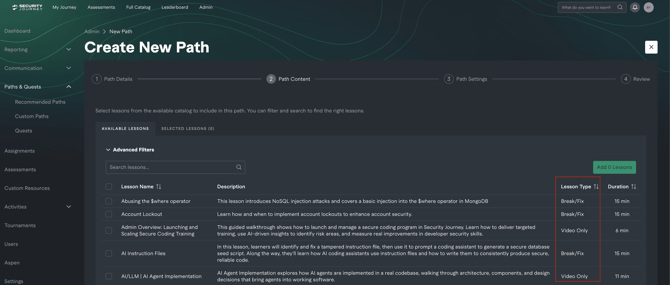
Easier Custom Path Creation with Lesson Type Labels
You can now see a Lesson Type column when creating a custom learning path in the Admin UI. This new column makes it easier to identify the type of lesson being added, helping you make informed decisions and build paths more efficiently.
May 27, 2026
New Learning Path — 2025 CWE Top 25 Most Dangerous Software Weaknesses
The 2025 CWE Top 25 Most Dangerous Weaknesses Path is now available!-
The video course uses short, focused lessons, with each CWE presented as a standalone module for easy targeted training
- The hands-on course allows you to exploit, remediate, and mitigate each weakness, reinforcing real-world secure coding skills
- Access the Lab Based learning path: 2025 CWE Top 25 Most Dangerous Software Weaknesses - Lab
- Access the Video Based learning path: 2025 CWE Top 25 Most Dangerous Software Weaknesses - Video
May 18, 2026
New Content Type & Platform Improvements
Improved “My Paths” and “My Quests” Experience
-
We’ve made it easier to keep track of your learning. When you enroll in a Path or Quest, it will now remain visible on your Journey page under My Paths or My Quests.
-
-
Your active Path or Quest will always appear as the first card in the row.
-
All other content will be displayed in alphabetical order for easier browsing.
-
Previously, enrolled content was removed from this section—now it stays front and center so you can quickly pick up where you left off.
Introducing AI Skills Labs
-
These labs are hands-on and interactive, designed to build practical AI skills.
-
No coding experience is required.
New Features & Platform Improvements
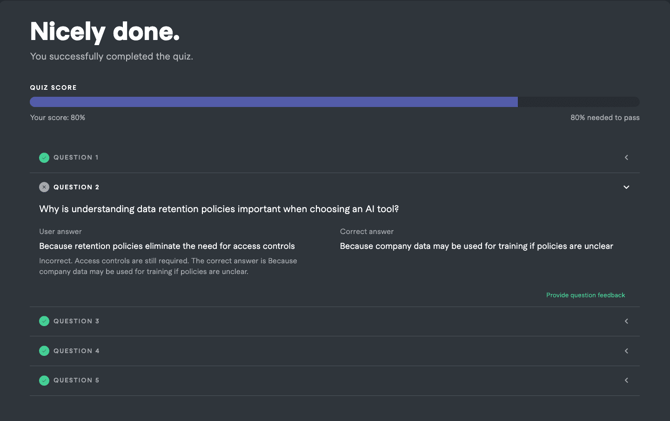
Improved Video Quiz Experience
We’ve made video quizzes more intuitive and engaging:
-
You’ll now see the correct answer upon quiz completion, helping reinforce learning in real time.
-
All quiz questions are now presented in a single, streamlined view for a smoother experience.
Expanded Intro Tour with AI Content
We’ve added two new AI-focused lessons to the Intro Tour, giving you an early look at key concepts and hands-on learning opportunities.
Faster Admin Dashboard Performance
The Admin Dashboard now loads more quickly, making it easier to access insights and manage your program efficiently.
May 15, 2026
New Learning Path — MCP Application Security
- The MCP Application Security path is now available
- Focuses on secure development practices for Model Context Protocol (MCP) applications, an emerging standard for connecting AI models to external tools and data sources
- Includes five hands-on lessons where learners identify and remediate vulnerabilities in MCP servers and clients
- Helps build practical understanding of security and access control risks in poorly implemented MCP systems
- Access the learning path: MCP Application Security
April 29, 2026
SCIM Improvement & Self-Initiated Assessments
SCIM Manager Field Support
- Manager Field Support via SCIM: Organizations can now sync manager relationships (Manager Name + Manager's Email) directly through SCIM, helping keep user data accurate and up to date automatically
New Feature: Self-Initiated Learner Assessments
- Self-Initiated Assessments: Learners can now take Assessments without admin assignment
- If no Assessments are in a user’s To-Do, an Assessment card will appear with available options
- All learners now have access to an Assessments tab for easy navigation
-
- Admins can view results via Assessment reporting
Learn more: Self-Initiated Assessments (Admin Guide)
April 15, 2026
Platform Improvements
- Added a quick link to “Chat with Support” in the user profile dropdown for faster access to or Support Team
- Increased maximum path name length to 100 characters to allow for more descriptive naming
April 8, 2026
Aspen Adapt API
Expanded Adapt Support: Adapt now supports integrations beyond GitHub. To learn more visit: Aspen Adapt API: Send CWE Findings to Security Journey.
April 6, 2026
Aspen Updates and Admin Experience Improvements
This release introduces major Aspen updates along with improvements to the admin experience, user management, and assignments.
Aspen Updates
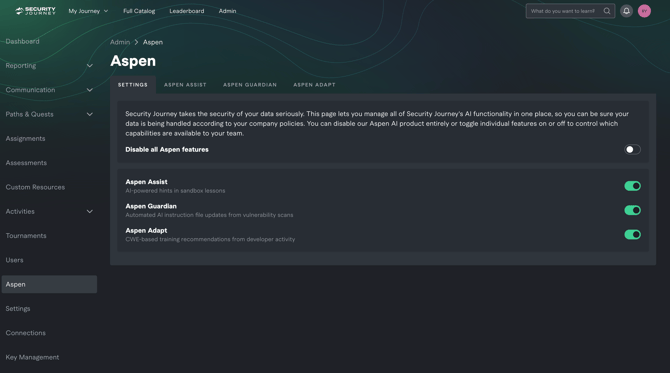
New Aspen functionality is now live, including dedicated pages for Guardian, Adapt, and Assist with feature toggling and metrics. Aspen now supports integrations beyond GitHub, and a new “Connections” page centralizes access to SSO, SCIM, Reporting API, and more.
Check it out here:
Admin Experience Improvements
The Admin UI for Custom Paths and Quests has been separated into dedicated pages, creating a more consistent experience aligned with the Recommended Path workflow.
User Management & Assignments
Admins now receive clearer feedback when making changes:
- A prompt reminds admins to save when adding or editing users in Assignments
- A message and loading indicator appear when users are added or removed, reflecting that the action is not instantaneous
- “Company” attribute has been added to the Users table
March 30, 2026
Platform Improvements and Admin Enhancements
Content Management & Exports
Admins can now export individual lessons from the Full Catalog or export entire learning paths directly from the Admin Path UI, improving content management flexibility.
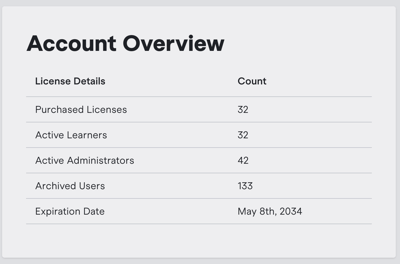
Reporting & Account Visibility
We’ve expanded the Account Overview and Usage reports with additional fields, including Purchased Licenses, Active Learners, Active Administrators, Archived Users, and Expiration Date—providing clearer insight into account activity and usage.
New Path: AI-Augmented Development
This new hands-on course builds on Modern AI Development Techniques and provides practical experience with widely used AI development tools and workflows. It covers secure practices for AI-assisted development, including AI coding tools (such as Codex), agent-based workflows, and the Model Context Protocol (MCP). Check it out here!
March 23, 2026
Platform Improvements and Admin Enhancements
Assignments & Tournaments
Developer profile fields are now available as assignable attributes when creating Assignments and Tournaments, enabling more targeted user segmentation. Additionally, when a tournament is set to “everyone,” users are now enrolled once they click “start,” simplifying participation.
Content Management & Exports
Leaderboards are now exportable, making it easier to analyze and share performance data outside the platform.
March 17, 2026
Enhanced Security Journey Platform
The Security Journey platform has been updated with a modernized experience for both learners and administrators.
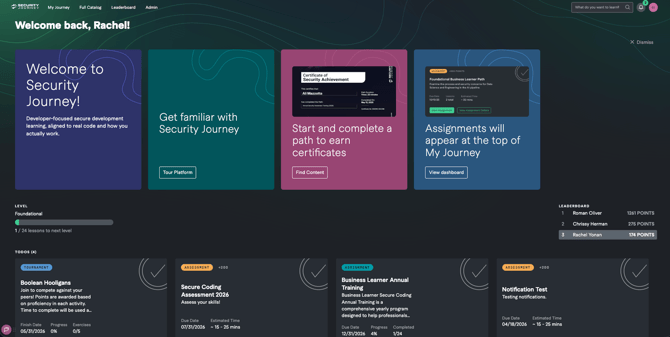
Key Updates
- New interface: Cleaner, more engaging design
- Improved navigation: Faster content access and new To-Do section
- Streamlined experience: Easier program management and smoother learning flow
- Enhanced catalog: Improved content discovery and relevance
- Light/Dark mode: Customizable viewing options
- Aspen Guardian: Real-time secure coding guidance
- Aspen Adapt: GitHub-driven, adaptive learning
Resources
- Admin and Learner overview recordings available for walkthroughs
March 16, 2026
New Path: OWASP Top 10: 2025 (Video)
We’ve launched a new training path covering the recently updated OWASP Top 10 web application security risks. This series features in-depth video lessons designed to build a strong foundation in modern web security threats. Pair these videos with our hands-on labs for a comprehensive, practical learning experience. Check it out here!
February 27, 2026
New Path: Secure Shell Programming Essentials
This hands-on course teaches learners how to identify common shell scripting vulnerabilities and remediate them using secure programming practices. It focuses on strengthening automation and operational workflows through more secure shell scripting techniques. Check it out here!
February 23, 2026
Removal of “HackEDU” Label from Hands-On Content
We’ve removed the “HackEDU” label from hands-on content to create a more consistent experience for all customers. Updated naming simplifies paths and lessons (e.g., “HackEDU: OWASP API Top 10” is now “OWASP API Top 10”).
February 2, 2026
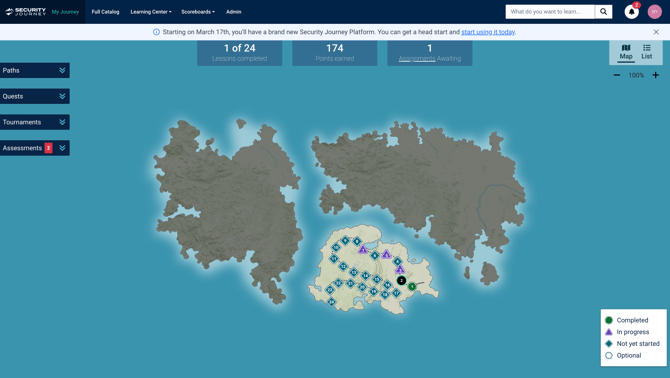
New Platform Experience Available: Explore the Updated UX/UI
What’s new
We’ve introduced an updated platform experience designed to be more modern, intuitive, and easier to navigate for learners.
What this means for you
The updated UX/UI is now available alongside the existing experience, allowing teams to explore the new interface at their own pace. You can switch between views while continuing your day‑to‑day work without disruption.
Why we did this
The new experience improves clarity and usability through:
- Cleaner lesson layouts and clearer lesson cards
- Better visibility into progress and estimated time to complete lessons
- A more streamlined, developer‑friendly design
What to expect next
During this transition period, we’re actively incorporating feedback to finalize the experience ahead of full adoption. A complete cutover is planned for early March 2026, and we’ll continue sharing updates to ensure a smooth transition.
January 7, 2026
New Courses: Modern AI Development Techniques + OWASP Top Ten 2025
Modern AI Development Techniques
A new course covering vibe coding featuring 8 lessons that cover the pros and cons of LLM-assisted development, and best practices for using AI responsibly in your workflows.
Find it under Paths & Quests > Recommended Paths > Video and Hands-On > Modern AI Development Techniques.
OWASP Top Ten 2025
We’ve launched a new OWASP Top 10 2025 course featuring 10 lessons aligned to the latest OWASP Top 10 2025 list. This update ensures your teams are training against the most current industry guidance and today’s top security risk priorities.
Find it under Paths & Quests > Recommended Paths > Hands-On Only > OWASP Top Ten 2025.
January 2, 2026
Aspen: Guardian AI and GitHub Integration
Aspen: Guardian AI
Aspen: Guardian AI turns real findings from your CI security scanners into targeted updates for your AI assistant’s rule file (like copilot-instructions.md or CLAUDE.md). It analyzes SAST results, converts recurring issues into prevention rules, and submits updates via pull request—creating a feedback loop that helps your assistant reduce repeat vulnerabilities as your codebase evolves.
For more information the feature and setup, check out this article: Aspen: Guardian AI
GitHub Integration
With a secure GitHub API key, our GitHub Integration can scan live commits, identify potential weaknesses by CWE, and surface those findings in the Security Journey platform. Admins get a prioritized view of emerging vulnerabilities and can use these insights to identify and assign highly relevant training based on what’s showing up in real code.
For more information the feature and setup, check out this article: GitHub Integration: Turn Real Code Activity into Targeted Secure Coding Training